Showing posts with label smart speaker. Show all posts

Tuesday, February 28, 2023

Smart speaker not useful? Give it more smart things to control!

Your smart speaker can control LOTS of stuff!

Overview


This article is meant to help you get the most out of your smart speaker and begin setting up your smart home. It's a deep dive into what I've learned first-hand by setting up and managing our own smart home devices. The main sections include: 
  • Is your smart speaker simply a brain without a body? 
  • Real Life Examples: A Typical Day in Our Smart Home
  • Summary of Our Smart Home Components
  • Getting Started with Your First Smart Room
  • Types of Devices That Seem to Work Well & Some That Don't 
  • The Smart Home Brands We Use and Recommend
  • Conclusion

Is your smart speaker simply a brain without a body? 


Anybody who's seen Star Trek knows that a star ship's crew lives in a kind of sentient cocoon, surrounded by smart devices that are coordinated by a central brain that's always ready to assist. Merely speak the wake word "Computer..." then make a request and that request is fulfilled.

Contrast this with that solitary smart speaker that your Uncle Billy bought, plopped in the corner of his living room and ignores except to ask it for the weather and set timers. He says he's not sure why he bought it and would certainly not waste money on another one. 

Here's the thing. Uncle Billy is simply not thinking big enough! The omnipresent "Computer" on that starship is connected to a navigation system, lighting and heating controls and all manner of devices which can deliver everything from "Tea ... Earl Grey, hot" to a multimedia, multi-sensory experience on the holodeck. Without these linked devices, that computer is just a disembodied voice. It might be an amusing conversation partner, but not truly useful in getting things done in the physical world.

And so it is with that smart home speaker. It needs a family of linked devices to live up to its full potential. And that family of devices can be easily matched to Uncle Billy's unique needs. Smart plugs, smart bulbs, smart cameras and media gear are all out there waiting to be brought home and connected. And they don't cost that much! 

Real Life Examples: A Typical Day in Our Smart Home 


I really like our smart home! It may not be the most sophisticated, but it just works. It consists of Google Home/Nest speakers, a bunch of smart electric plugs that switch ordinary "dumb" devices on/off, some smart light bulbs, a few security cameras and some smart media equipment. 

Note: We own a couple of Amazon Echo devices but have found them to be much less useful and dependable than our Google devices. So the interactions described here all take place within our Google Home/Nest ecosystem. All eight of these are strategically positioned so we can talk to them anywhere we happen to be in our house, garage, patio or back yard.

So what does all this stuff do for us? Here's a typical day in our relatively "smart" home. 

Friday, January 28, 2022

Replacing Google Play Music: How I Store & Stream 22 GB of My Own Music (MP3s) for a One-Time Cost of $7.99


Ah, Google Play Music... How I miss you!


Once upon a time, I was a loyal and satisfied Google Play Music customer. I used it to:
  • Upload and store thousands of my own MP3 music files (many pulled from my own CDs) in the cloud.
  • Search for and purchase new music as MP3 files.
  • Stream music to my Android tablet and phone.
  • Save and play my custom playlists offline.
  • Cast music to any combination of my eight Google Home speakers.
  • Stream music from my phone to my Android Auto screen and control playback hands-free while driving.
And all this was free of any monthly costs and free of advertising. The only cost was a one-time purchase fee for new songs or albums from the Google Play store.

And then Google killed Google Play Music and replaced it with YouTube Music, which requires that I pay a monthly fee for doing many of the things that Play Music did for free. Worse, they insert ads where there had been none before!

The bottom line: I decided to figure out how to replicate the old Google Play Music experience using free alternatives. And I'm pleased to say that my new music streaming system works great!

My New Cloud Storage & Streaming System


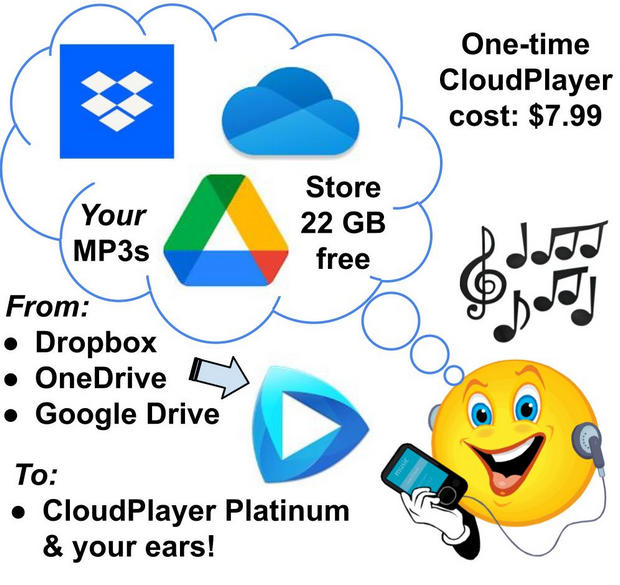
Here are the key components of my Google Play Music replacement:
Using the components above, I am able to do pretty much everything I was able to do with Google Play Music, including casting music to any cast-enabled device. The only thing missing is the ability to initiate music playing by saying, "Okay Google, play [playlist]..." Instead, I use my phone or tablet as a remote control to begin casting a particular playlist via CloudPlayer. Then, once the playlist has started playing on my Google Home or Nest smart speakers, I can use "Okay Google..." voice commands to stop, pause, rewind, tell me the name of the song that's playing, etc. So for a one-time cost of just $7.99 I get pretty much everything I need from my personal, custom-made, ad-free streaming service. **

(NOTE: If I had a TON of my own music and needed more than 22 GB I could buy 100 GB of storage for just $20/year from Google Drive. But, for now at least, I have plenty of cloud capacity so I'm going to stick with my free 22 GB storage strategy.)

So how can you set up your own service like this? It's easy! Below are the steps.


How to Build Your Own 22GB Cloud Streaming Service for One-Time Fee of $7.99

Wednesday, November 25, 2020

6 Podcasts to Help You Become an Amateur Tech Geek

Ever wonder how that geeky friend of yours got to know so much about the the latest mobile hardware, home theater gear, home automation tools, amazing apps, etc.? Truth is, most amateur tech geeks simply spend more time paying attention to, and learning about, all things techy than other people. In fact, if they're like me (an admitted amateur tech geek), they'll admit that they'd rather spend time listening to a tech podcast or reading about new tech products than they would scrolling through social media posts. 

It's simply a matter of where you spend your time and attention. You can learn a lot about anything if you just focus on it for an hour or so every day. And a fun bonus of tech learning is that the more you learn about all those weird and wonderful products, the more you want to go get them and try them!  And eventually you could become your family's one-person geek squad, solving their tech problems and learning even more in the process! 

Six Podcasts to Get You Started

One of the easiest ways to immerse yourself in tech stuff is to subscribe to a few tech podcasts and replace some of your time spent scrolling through Facebook or Instagram or Twitter with time spent listening to tech experts. Just download the podcasts to to your phone, then when you're standing in line shopping or exercising or doing chores you can listen and learn! Or better yet, you can tell your smart speaker to "Play the latest episode of [XYZ podcast]" while you are showering or shaving or doing the dishes. 

Below are six of my favorite tech podcasts to help you get you started. I've listed them in order of their tech-geeky density.  And I've linked each to its listing in Google Podcasts. It's my podcast player of choice because it syncs podcasts across all my devices and picks up where I "pause" when I switch from one device to another. So I can start listening on my phone, pick up where I left off in my car's Android Auto, then finish up at home on my Google Home (Nest) smart speakers. (Google Podcasts is available in the App Store for iOS or Google Play for Android.)


Marketplace Tech (5 - 10 min daily) - Publisher's description: "... 'Marketplace Tech' demystifies the digital economy. The daily radio show and podcast uncovers how tech influences our lives in unexpected ways and provides context for listeners who care about the impact of tech, business and the digital world... Marketplace Tech uncovers themes that transcend the hype in an industry that’s constantly changing... host Molly Wood asks smart questions that connect the dots and provide insight on the impact of technology... "

The Tech Guy ( 2 1/2 hours, every Sat & Sunday) - This was my first ever tech program! Listeners call in with all sorts of ordinary tech problems from the simple to the highly complex and get practical, how-to advice. Whether it's fixing your printer or unraveling your home WiFi, Leo can walks ordinary folks like us through the solution, step by step. Publisher's description: "No one does a better job of explaining technology, computers, and the Internet than Leo Laporte. This feed contains the full audio of his twice weekly radio talk show... For show notes and more visit techguylabs.com."


This Week in Google (2 1/2 hours, weekly)- This one is difficult to describe. It's sorta like listening to "The View" if it were conducted by smart, tech-savvy futurists. And don't let the title fool you. It's about FAR more than Google. It covers smart homes, the internet of things (IOT), Facebook, Congress vs. Big Tech, artificial intelligence, the history of tech and innovations and on and on. It's my "never miss" podcast!"

Tech News Weekly - (1 hour, weekly) This one's all about doing a deeper dive beneath the tech news headlines that you might hear about elsewhere. Publisher's description:  "Tech News Weekly hosted by Jason Howell and Mikah Sargent brings you interviews from tech journalists who make or break the top stories of the week. Jason and Mikah give you more context and perspective, with an in-depth look at the fast-paced world of technology and how it is changing our lives."


Techmeme Ride Home - (15 minutes, daily) This one's for the official, professional tech geeks. But you can still learn a lot if you're willing to be a little confused now and then and do some quick research to unravel the acronyms!  Publisher's description: "The day's tech news, every day at 5 pm. From Techmeme.com, Silicon Valley's most-read news source. 15 minutes and you're up to date."


Daily Tech Headlines - (5 - 10 minutes, daily) Another podcast for tech pros and tech marketing folks. It will stretch you! So try a couple and see how you like it. Publisher's description: "The essential tech news you need every day in 10 minutes or less."


___________________________


It's Okay to Be Confused!

Listening to these podcasts will get you started on your path to amateur tech geekdom. And remember: It's okay to be confused while listening! If you're not a bit confused from time to time, then you're not stretching yourself. So dive in, give yourself permission to get lost, press "Pause" and Google what's confusing you before you continue. Or rewind, if necessary, to hear that confusing part again. (I do this all the time and I've been listening to this stuff for over two decades!)  

You're likely to find that it's fun to be challenged and "always learning!"  And in the meantime, your family and friends might soon come to rely on you as their local tech support guru!  Enjoy!