Showing posts with label google drive. Show all posts

Sunday, September 7, 2025

Worth Sharing Again: A Few of My Favorite Tech Choices


Over the years I have developed some strong opinions about my tech tools. And sometimes my choices surprise my friends or relatives, requiring me to explain myself! In a few cases I decided to elaborate, once and for all, by capturing a complete explanation in a blog post. Below are four such explanations that I believe are Worth Sharing again. I hope you find them interesting or enlightening!

Chromebooks are low-cost, secure, fast and tough enough for schools to buy them and pass them out to students! So what's so great about them? This article summarizes the benefits my wife and I have found.
Zuckerberg's Facebook is a cesspool of misinformation and purposely "sticky" garbage. Learn all about Bluesky, a grown-up alternative to Facebook that's populated by folks with generally positive vibes.
The title says it all. Learn how you can rip all those tracks from your CDs and stream them yourself for the one time cost of just $14.99 (... up from $7.99 when the article was first posted).
This is a review of my favorite apps -- little power houses that help me do all sorts of good stuff. Maybe you'll find one or two that are new to you! 


Sunday, December 8, 2024

Saturday, February 17, 2024

11 Apps I Use Almost Every Day


 Icons shown: Google Home, Gmail, Google Drive, Google Maps, Spiral Player, Pocket, Keep Notes, Brave Browser, Pluto TV, Google News, AntennaPod


So... What's an app, anyway?


It's easy to take apps for granted. Typically they are tight, highly-focused applications (i.e., "apps") that help us accomplish particular chores in a user-friendly way. Wikipedia defines an app as, "...  a software program that's designed to perform a specific function directly for the user or, in some cases, for another software program." Mobile apps are often hardware-specific and designed to run on particular mobile devices while web apps are designed to run inside web browsers that might be working anywhere on the web. 

The key: While we may sometimes experiment with apps that seem interesting or perform exotic functions, the apps that matter most to us are the ones we rely on every day to achieve specific goals. In other words, we don't run apps for the sake of running apps; we run apps to get stuff done that is important to us. 

My Everyday Essential Apps

I just asked my smart phone's "Settings" to list my installed apps. It replied: "List all 161 apps?" Yikes! I only use about a dozen on a regular basis! Apparently my habit of installing apps to "check them out" should be matched with a habit of uninstalling ones I don't use. (Note to self: Scanning this list, I see a bunch I don't remember ever using. Time to do an "app inventory/sort/remove!")

In any case, I'm here to share the apps that I find indispensable and use almost everyday... sometimes many times a day. These are

Google Home - The Google Home app is the command center to keep all our smart devices coordinated. We have eight Google Home (now called "Nest Audio") smart speakers arranged all over our house, so we can pretty much yell "Hey, Google..." from wherever we happen to be and activate one of them to do work for us. My wife and I both use these smart speakers many times per hour to set timers, give us weather reports for anywhere on the planet, answer all sorts of search queries, play news reports/podcasts and carry out verbal instructions to control our 40 plus Smart Home devices such as smart plugs, WiFi-enabled light bulbs and TV.   (Here's a deep dive into how we control and use all our smart home devices:  Smart speaker not useful? Give it more smart things to control! )

Google News feed - This one is addictive! A simple swipe right on my Android phone continually refreshes a never ending bunch of news articles. So I have to be careful with this, since it can suck me into hours of news consumption! What makes it so addictive is that over the years Google has learned what my interests are. So most of the articles the feed shows me are likely to capture my time and attention. (For more info, see: Apple version. Android/Google Play store version.)

Brave Browser - It blocks ads! Period. I repeat: the Brave browser blocks ads! So your browsing experience with Brave is fast and private and uninterrupted by annoying ads. According to the Brave Community, "Brave is fully open source, unlike other Chromium browsers that are managed by a company: Chrome, Edge, Vivaldi, Opera." And it's available on all your devices: Windows, macOS, Linux, Android and iOS.  Learn more here at the Brave browser website.  

Keep Notes - Think "yellow stickies" or note cards. Keep Notes allows you to take notes, make lists and attach links, photos and other files to each of them. Keep Notes can be color-coded and are synchronized and easily searchable across all your devices. So when you make a change in a note on your tablet it's immediately reflected on your phone or computer. My wife and I have a shared Keep note that is our shopping list. When we run out of something we either add it directly to the Shopping list on one of our phones or tablets or simply yell at one of our Google Home (Nest) smart speakers or tap our phone's Google Assistant, telling it to add the item to the Shopping list. Then when we're out shopping we simply check off items as we put them in our cart. Since the list is updated immediately, we both know what's left on our shopping scavenger hunt! I also have Keep Notes which track my car and other home maintenance chores, noting the dates that I completed them, dated reminders to perform them again next time and any relevant details like the service person phone number, serial numbers, etc. Finally, all of my documents, including this blog post, start out as rough ideas dictated into a Keep Note using Google's voice typing keyboard

AntennaPod - There are currently millions of podcasts available on all kinds of topics. I use AntennaPod to search for and subscribe to those that are of interest to me. The app collects the published titles of available episodes and allows me to pick and choose which ones I stream immediately or download for offline use. Listings include audio or video podcasts. But I almost always choose audio so I can do chores or exercise while listening.

Gmail -  It's been nearly 20 years since Google introduced this powerful free email service. Over the years it has become more flexible and powerful, allowing tagging, sorting, forwarding, message chaining, blocking and many other options to help you manage your email.  If you're not using it you really should consider trying it. In fact, many people have several Gmail accounts, using one with family and friends, one with vendors and one for professional contacts. After all, it's free to get an account and, at minimum, you can use it with all those product registration sites which require an email address and could potentially bomb you with Spam. Gmail has wonderful spam guards that will keep most of that stuff out of your sight. (See: "What's So Great About Gmail?" wherein Lifewire explains...  -  https://www.lifewire.com/benefits-of-gmail-1616254 )

Pocket - If you're like me, there are times when you run across an article that looks interesting but you don't have the time to read it immediately. This is where Pocket comes in. In fact, I use it to help me sort my Google News feed. If it's an article I want to read later, I pop it open from the news feed, click the share option and send it to Pocket. Later, when I have the time, I can either read the article in text form or listen to it as Pocket's automated voice reads it aloud while my hands and eyes are busy doing other things.

Google Drive - If you have Gmail (see above), you automatically have 15 GBs of free storage space available on all your devices, in the cloud, from Google. And by using Google Docs or Sheets or Slides (available online via your Google Drive) you can create documents that can be shared with other people. I use my Google Drive to share all sorts of personal documents, business documents and agendas, etc. created by my fellow Indivisible activists. Because it's in the cloud, anyone can collaborate with you on a document and edit from anywhere on the planet. This kind of collaboration can actually change history. (See "How Google Docs Became a Key Tool for Social Justice" )

Google Maps - Just look at this feature-laden description from WikiPedia, "Google Maps is a web mapping platform and consumer application offered by Google. It offers satellite imagery, aerial photography, street maps, 360° interactive panoramic views of streets (Street View), real-time traffic conditions, and route planning for traveling by foot, car, bike, air (in beta) and public transportation. As of 2020, Google Maps was being used by over one billion people every month around the world." I use Google Maps to analyze all my trips to unfamiliar locations, to check out traffic and alternate routes and to navigate, in real time, while driving. It's my constant travel companion!

Pluto TV - With Pluto TV you can watch a zillion streaming TV channels on your smart phone, tablet, Roku box or simply via your web browser on your PC. Think of it as a giant, free cable service with shows constantly streaming for you to watch. Some shows are also available on demand. 

Spiral Player - "Spiral Player is a cloud & offline music player..." Long ago I ripped a zillion MP3 files from my favorite CDs and uploaded some of them to Google Drive, some to the New Zealand-based Mega online drive, and other cloud storage locations. I use Spiral Player to access and play them all. Sometimes it streams from the cloud and sometimes it plays stuff directly from my device. It plays from folders, albums, or your own custom-made playlists. 

BONUS: YouTube without Ads! - Want to watch YouTube without ads? Then open your Brave Browser (above), make sure you have "Shields Up..." [top right, orange icon/image of lion in Brave Browser] then go to: m.youtube.com -- Lotsa videos, No ads!

Conclusion

So these are my everyday, "go to" apps. If you aren't familiar with some of these, I hope you check them out. You may just find, like I have, that they soon become indispensable!  

Tuesday, December 12, 2023

In Case You Missed Them: Top 5 Articles Worth Sharing in 2023


This year I found all kinds of stuff worth sharing, from the cosmic & philosophical to the nitty-gritty &  practical. In case you missed them, here are my picks for the top five articles I posted in 2023. Hope you find them interesting!

Inside the Black Box: Thoughts on Judgement, Intuition, Synthesis & Artificial Intelligence


The end of 2022 (November 30, to be exact) saw the introduction of Chat GPT. After playing around with it a while, I shared my reactions and discussed what I saw as the implications for content creators. See: Inside the Black Box: Thoughts on Judgement, Intuition, Synthesis & Artificial Intelligence


Smart speaker not useful? Give it more smart things to control!


Go to article: Smart speaker not useful? 

As my wife will tell you, I am a super-geeky early adopter of all kinds of tech gizmos and gadgets. Some are productivity enhancers and others are just cool, fun conveniences to have in our house. Given my own relationship with smart things, I am always amazed when someone says, "I got one of those smart speakers [Google Home, Amazon Echo, etc.] and I don't think it's all that useful."  My reaction: "What!! Well, you need to fire up your imagination and put these things to work for your family!"

In the article Smart speaker not useful? Give it more smart things to control! I share a typical "day in the life..." of our smart speakers & connected devices. It's loaded with practical, real-world applications that you can apply to your home to make your smart things more useful.  

A Curated, 21-Video Study Guide for Absolute AI (Artificial Intelligence) Newbies: What It Is, Where You Can Play with It & How We Might Want to Shape Its Role in Our Lives


Go to article: A Curated, 21 Video Study Guide...

The title says it all: This is my easy-to-assimilate video intro to AI (artificial intelligence).  

One Year Later: How Our Chromebook is Working Out


Go to article: One Year Later...

That graphic above tells the story: No Windows, Only Chromebook: 1 Year Later.  This is my review of our new life without Windows in Google's Chrome OS world. (Spoiler: It's just fine!)

My Three Websites: A Lot of Stuff Worth Sharing

Go to article: My Three Websites...

In this article, I remind readers that I have a couple of other "frozen" websites that are loaded with tools and information to help manage projects and teams. 

_________

So that's it. Just wanted to make sure you didn't miss these articles that you might find useful or thought-provoking. 

Happy Holidays!


Thursday, December 22, 2022

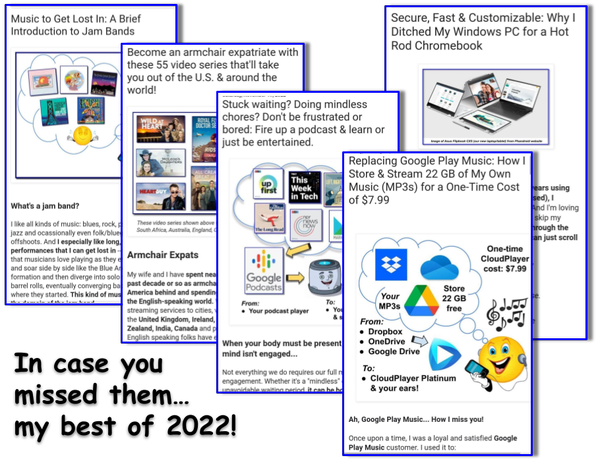
In Case You Missed Them: My Best Articles of 2022


Here are five articles that I spent a lot of time researching and writing in 2022. They are all loaded with links that will take you even deeper into the topics presented. I'm proud of these and I hope you find them informative. Happy New Year! 🎉 🎆 😁

_______________________


Replacing Google Play Music: How I Store & Stream 22 GB of My Own Music (MP3s) for a One-Time Cost of $7.99

[excerpt] "Here are the key components of my Google Play Music replacement:

Using the components above, I am able to do pretty much everything I was able to do with Google Play Music, including casting music to any cast-enabled device...."


_______________________
 

Become an armchair expatriate with these 55 video series that'll take you out of the U.S. & around the world!

[excerpt] "Below is a list of 55 fictional series we have seen and recommend, categorized by the part of the world to which they will take you. The majority of these are from two low-cost sources: Acorn TV ($5.99/month) and PBS Passport ($5/month). A few are from Hulu and Netflix. ..." 


_______________________

Music to Get Lost In: A Brief Introduction to Jam Bands

[excerpt] "I like all kinds of music: blues, rock, psychedelic, R&B, jazz and occasionally even folk/bluegrass and their offshoots. And I especially like long, well-developed performances that I can get lost in -- the kind of music that musicians love playing as they engage a melody and soar side by side like the Blue Angels in tight formation and then diverge into solo musical loops and barrel rolls, eventually converging back at the melody where they started. This kind of musical aerobatics is the domain of the jam band..."  NOTE: Article includes links to 9 full-length pieces of music from my favorite jam bands. 

[Read the full article here.] 

_______________________

Secure, Fast & Customizable: Why I Ditched My Windows PC for a Hot Rod Chromebook

[excerpt] "[In this comprehensive article]...you can skim through the stuff in bold to find the big ideas. Or you can just scroll down to one of these main sections:
  • After 30 years, enough with Windows, already!
  • Chromebooks dominate in education because they're powerful & easy to use.
  • Chromebooks are REALLY secure.
  • Chromebooks are fast! (Thanks to the ChromeOS.)
  • Chromebooks are customizable.
  • Buyer beware! It may be cheap, but when does that low-cost Chromebook expire?
  • My Chromebook: Part of a Powerful Ecosystem of Google Tools
  • Final Thoughts: How 40 Years of Personal Computing Has Led Me to a Chromebook
  • Bonus Tip: Don't throw away that old Windows PC or Mac. You might be able to make it a Chromebook!
[FYI: This article contains over 60 links to references for further research. Enjoy!]"

 [Read the full article here.] 

_______________________


Stuck waiting? Doing mindless chores? Don't be frustrated or bored: Fire up a podcast & learn or just be entertained.


[excerpt] "... Podcasts are the answer to dealing with mental "downtime." They give you your own custom-tailored content stream which you can access at your own pace and on your own schedule. Specifically: 
  • You can pause them when you need to switch your attention to your otherwise boring chore and then pick them up later. 
  • If you miss something because your chore needs you for a few minutes, you can easily "rewind" the podcast and go back and repeat what you missed.
  • You can listen to them at high speed, without chipmunk voices, but with the pauses and spaces squeezed out. (See the settings in your podcast player or this on Google Podcasts' "Podcast Controls" from PC Mag, for details.)
  • You can save them for later and even binge listen to a whole series you may have missed.  
  • With today's smart speakers (Google Home, Amazon Echo, etc.) you can do all of the above completely hands free while you move around your house. 
  • Using Android Auto or Apple CarPlay you can start or continue listening to your Google Podcasts (and most other podcast apps) while you drive. 

How to Get Started 

Are you new to podcasts? Here's an easy way to get started... "

 [Read the full article here.] 

_______________________

See also:

Monday, July 18, 2022

Secure, Fast & Customizable: Why I Ditched My Windows PC for a Hot Rod Chromebook

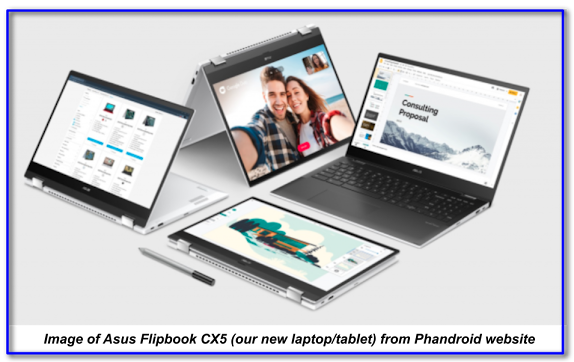
Go to Phandroid Article: "The Incredible Asus Chromebook Flip CX5..."

Overview


In this article I explain why, after over 40 years using personal computers (mostly Windows-based), I  switched to a powerhouse Chromebook. And I'm loving it! If you're in a hurry (and you're willing to skip my carefully-crafted prose😞) you can skim through the stuff in bold to find the big ideas. Or you can just scroll down to one of these main sections:
  • After 30 years, enough with Windows, already!
  • Chromebooks dominate in education because they're powerful & easy to use.
  • Chromebooks are REALLY secure.
  • Chromebooks are fast! (Thanks to the ChromeOS.)
  • Chromebooks are customizable.
  • Buyer beware! It may be cheap, but when does that low-cost Chromebook expire?
  • My Chromebook: Part of a Powerful Ecosystem of Google Tools
  • Final Thoughts: How 40 Years of Personal Computing Has Led Me to a Chromebook
  • Bonus Tip: Don't throw away that old Windows PC or Mac. You might be able to make it a Chromebook!
[FYI: This article contains over 60 links to references for further research. Enjoy!]
______________________________________________________

Friday, January 28, 2022

Replacing Google Play Music: How I Store & Stream 22 GB of My Own Music (MP3s) for a One-Time Cost of $7.99


Ah, Google Play Music... How I miss you!


Once upon a time, I was a loyal and satisfied Google Play Music customer. I used it to:
  • Upload and store thousands of my own MP3 music files (many pulled from my own CDs) in the cloud.
  • Search for and purchase new music as MP3 files.
  • Stream music to my Android tablet and phone.
  • Save and play my custom playlists offline.
  • Cast music to any combination of my eight Google Home speakers.
  • Stream music from my phone to my Android Auto screen and control playback hands-free while driving.
And all this was free of any monthly costs and free of advertising. The only cost was a one-time purchase fee for new songs or albums from the Google Play store.

And then Google killed Google Play Music and replaced it with YouTube Music, which requires that I pay a monthly fee for doing many of the things that Play Music did for free. Worse, they insert ads where there had been none before!

The bottom line: I decided to figure out how to replicate the old Google Play Music experience using free alternatives. And I'm pleased to say that my new music streaming system works great!

My New Cloud Storage & Streaming System


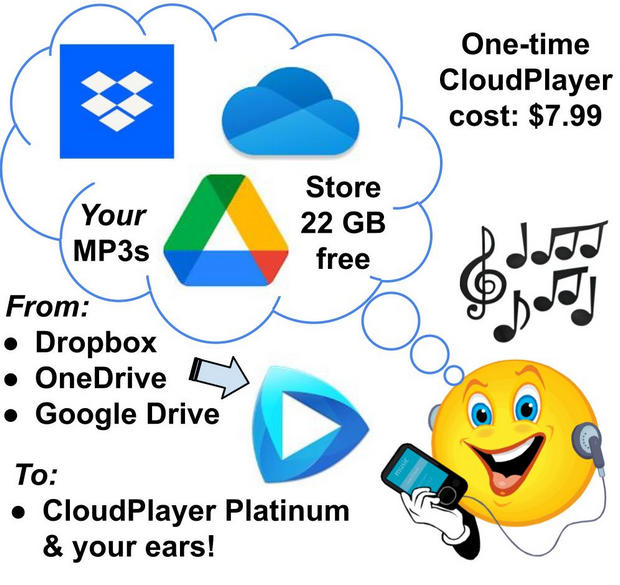
Here are the key components of my Google Play Music replacement:
Using the components above, I am able to do pretty much everything I was able to do with Google Play Music, including casting music to any cast-enabled device. The only thing missing is the ability to initiate music playing by saying, "Okay Google, play [playlist]..." Instead, I use my phone or tablet as a remote control to begin casting a particular playlist via CloudPlayer. Then, once the playlist has started playing on my Google Home or Nest smart speakers, I can use "Okay Google..." voice commands to stop, pause, rewind, tell me the name of the song that's playing, etc. So for a one-time cost of just $7.99 I get pretty much everything I need from my personal, custom-made, ad-free streaming service. **

(NOTE: If I had a TON of my own music and needed more than 22 GB I could buy 100 GB of storage for just $20/year from Google Drive. But, for now at least, I have plenty of cloud capacity so I'm going to stick with my free 22 GB storage strategy.)

So how can you set up your own service like this? It's easy! Below are the steps.


How to Build Your Own 22GB Cloud Streaming Service for One-Time Fee of $7.99

Monday, April 30, 2018

Re-Introducing My YouTube Channel (A 10-Video Sampler)


I LOVE sharing cool stuff! And one of the best ways to share anything is through a video "walk through" that demonstrates how it works, what's so great about it, etc.

Over the years I've collected quite a lovely pile of videos in my YouTube Channel.  In fact, as of this writing, there are over 90 videos organized into five different playlists. (And there are absolutely no annoying ads! ☺👍)

So since I've recently relaunched this website, I figured it might be a good time to re-introduce my YouTube Channel.

My 10-Video Sampler: A Little Bit of Everything