Showing posts with label Chromecast. Show all posts

Tuesday, February 28, 2023

Smart speaker not useful? Give it more smart things to control!

Your smart speaker can control LOTS of stuff!

Overview


This article is meant to help you get the most out of your smart speaker and begin setting up your smart home. It's a deep dive into what I've learned first-hand by setting up and managing our own smart home devices. The main sections include: 
  • Is your smart speaker simply a brain without a body? 
  • Real Life Examples: A Typical Day in Our Smart Home
  • Summary of Our Smart Home Components
  • Getting Started with Your First Smart Room
  • Types of Devices That Seem to Work Well & Some That Don't 
  • The Smart Home Brands We Use and Recommend
  • Conclusion

Is your smart speaker simply a brain without a body? 


Anybody who's seen Star Trek knows that a star ship's crew lives in a kind of sentient cocoon, surrounded by smart devices that are coordinated by a central brain that's always ready to assist. Merely speak the wake word "Computer..." then make a request and that request is fulfilled.

Contrast this with that solitary smart speaker that your Uncle Billy bought, plopped in the corner of his living room and ignores except to ask it for the weather and set timers. He says he's not sure why he bought it and would certainly not waste money on another one. 

Here's the thing. Uncle Billy is simply not thinking big enough! The omnipresent "Computer" on that starship is connected to a navigation system, lighting and heating controls and all manner of devices which can deliver everything from "Tea ... Earl Grey, hot" to a multimedia, multi-sensory experience on the holodeck. Without these linked devices, that computer is just a disembodied voice. It might be an amusing conversation partner, but not truly useful in getting things done in the physical world.

And so it is with that smart home speaker. It needs a family of linked devices to live up to its full potential. And that family of devices can be easily matched to Uncle Billy's unique needs. Smart plugs, smart bulbs, smart cameras and media gear are all out there waiting to be brought home and connected. And they don't cost that much! 

Real Life Examples: A Typical Day in Our Smart Home 


I really like our smart home! It may not be the most sophisticated, but it just works. It consists of Google Home/Nest speakers, a bunch of smart electric plugs that switch ordinary "dumb" devices on/off, some smart light bulbs, a few security cameras and some smart media equipment. 

Note: We own a couple of Amazon Echo devices but have found them to be much less useful and dependable than our Google devices. So the interactions described here all take place within our Google Home/Nest ecosystem. All eight of these are strategically positioned so we can talk to them anywhere we happen to be in our house, garage, patio or back yard.

So what does all this stuff do for us? Here's a typical day in our relatively "smart" home. 

Friday, January 28, 2022

Replacing Google Play Music: How I Store & Stream 22 GB of My Own Music (MP3s) for a One-Time Cost of $7.99


Ah, Google Play Music... How I miss you!


Once upon a time, I was a loyal and satisfied Google Play Music customer. I used it to:
  • Upload and store thousands of my own MP3 music files (many pulled from my own CDs) in the cloud.
  • Search for and purchase new music as MP3 files.
  • Stream music to my Android tablet and phone.
  • Save and play my custom playlists offline.
  • Cast music to any combination of my eight Google Home speakers.
  • Stream music from my phone to my Android Auto screen and control playback hands-free while driving.
And all this was free of any monthly costs and free of advertising. The only cost was a one-time purchase fee for new songs or albums from the Google Play store.

And then Google killed Google Play Music and replaced it with YouTube Music, which requires that I pay a monthly fee for doing many of the things that Play Music did for free. Worse, they insert ads where there had been none before!

The bottom line: I decided to figure out how to replicate the old Google Play Music experience using free alternatives. And I'm pleased to say that my new music streaming system works great!

My New Cloud Storage & Streaming System


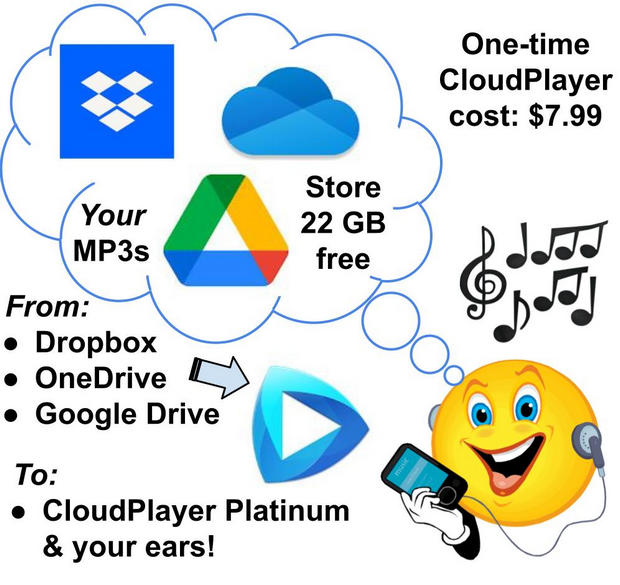
Here are the key components of my Google Play Music replacement:
Using the components above, I am able to do pretty much everything I was able to do with Google Play Music, including casting music to any cast-enabled device. The only thing missing is the ability to initiate music playing by saying, "Okay Google, play [playlist]..." Instead, I use my phone or tablet as a remote control to begin casting a particular playlist via CloudPlayer. Then, once the playlist has started playing on my Google Home or Nest smart speakers, I can use "Okay Google..." voice commands to stop, pause, rewind, tell me the name of the song that's playing, etc. So for a one-time cost of just $7.99 I get pretty much everything I need from my personal, custom-made, ad-free streaming service. **

(NOTE: If I had a TON of my own music and needed more than 22 GB I could buy 100 GB of storage for just $20/year from Google Drive. But, for now at least, I have plenty of cloud capacity so I'm going to stick with my free 22 GB storage strategy.)

So how can you set up your own service like this? It's easy! Below are the steps.


How to Build Your Own 22GB Cloud Streaming Service for One-Time Fee of $7.99

Friday, July 24, 2020

Get award-winning movies & TV shows, audio books, graphic novels, & ebooks FREE (no ads!) from your local library.


Rare, festival-quality films, blockbuster movies & TV shows, best selling digital and audio books, even graphic novels -- you can get all these free from your local library!  All you need is your free library card and the free Libby, Kanopy and Hoopla apps. 

Here's how it works: Libby, Kanopy and Hoopla are services that have set up relationships with most libraries to stream content to their library card holders. Since we are already supporting our local public libraries with our taxes or our college and university libraries with our fees, we can get all this content for free and with no ads or commercials!* 

So why pay to stream a movie? Why buy a book or graphic novel? Why not borrow and return them for free? Your library card and these apps will get you connected.


Your Golden Ticket: A Free Library Card


To get started, you'll need at least one library card** and your matching user ID, pin number or other account info. This is probably the only time that you'll be required to physically show up at your library. They'll want to see your driver's license or other documents to confirm your identity before they give you your card. After that, you can do the rest online from the comfort of your home. (TIP: While you're there, ask the librarian if the library has a relationship with Libby, Kanopy or Hoopla and ask if they have any advice for you about setting up the services.)


Libby: The Reading (and Audio Book) App


Using the Libby app on your phone or tablet you can download and read ebooks or listen to audio books. Depending on your library's rules, you can keep a book for up to two weeks, though you're typically able to renew it if you need more time. The app itself is feature-rich and really easy to use. And you can set it up to draw from more than one library if you have multiple library cards. You can use either the Libby app to read your downloaded books or, if you prefer, switch to your Kindle app. From within the app you can search each of your registered libraries for a book, reserve it, download it, read or listen to it, set bookmarks, highlight text and more. Check out the links below for more info.


More Info: 


Kanopy: Great Movies, Documentaries & Hard-to-Find Films


This is the app for film buffs, self-directed learners and popcorn-on-the-couch movie fans! You can use it on all all of your mobile devices or fire up that big, beautiful TV and stream HD through your Roku app or Chromecast.

The San Francisco Public Library summarizes:  "Kanopy is an award-winning, on-demand streaming video platform for public libraries and universities that offers access to more than 30,000 independent and documentary films ─  titles of unique social and cultural value from The Criterion Collection, The Great Courses, Media Education Foundation, and thousands of independent filmmakers."  - SF Public Library FAQ  


More Info:  

Hoopla: All of the Above, Plus Music, TV Shows & Graphic Novels


From the Hoopla website:  "Hoopla is a groundbreaking digital media service offered by your local public library that allows you to borrow movies, music, audiobooks, ebooks, comics [graphic novels] and TV shows to enjoy on your computer, tablet, or phone – and even your TV!"

Think of it this way: Hoopla provides the same categories of media as Libby and Kanopy, plus music, TV shows and graphic novels!  What's more, it has a special Kids section with loads of boredom killers for your kids. While it's available via an app on all your portable devices, you can also stream the treasures you find via the Roku app, Chromecast, Fire, Apple TV & other devices.


More Info:

_______________________________________________

* The number of media items you can borrow in a given period (week, month, etc.) will vary depending on your library's rules and the contract restrictions placed on them by Kanopy or Hoopla. Libby automatically limits your downloads based on your library's rules.
_______________________________________________

** Don't have a library card? 

I hear you! I was raised in the country, far from the many libraries that are easily accessible to us city folk. However, as a country kid I learned, much to my delight, that many nearby cities, counties or even larger state regions allow people to use their libraries free of charge, as neighbors and citizens of those broader areas. What's more, some local college and university libraries have community outreach programs that allow the public to use their services. So... If you don't have a library nearby, do a Google search for "closest public library" and see what you find. It may be worth a bit of a road trip to get hooked up with a shiny new library card and, in turn, one of the free services described here. (But don't forget to call ahead & tell them what you are looking for.) Good luck!

_______________________________________________

Related Articles: