What makes an app worth paying for?
There are three criteria that make me willing to shell out a little cash for an app:
- It's really good at what it does. That is, it's powerful, efficient, does something unique/amazing or it's a real time saver.
- I use it a lot and I don't want to be distracted by ads! Maybe I'm spoiled by years of ad-free media streaming and browser ad-blockers, but seeing ads in an app that I frequently use drives me nuts! So I'm glad to pay a reasonable fee to remove the ad clutter.
- I want to support the app's developers. After all, if I don't want them to monetize their app with ads and they have created an app that I really value, then I have a moral obligation to see that they somehow get paid for their work!
The apps described below meet all three of these criteria. If you're an Android user, you should consider them. (FYI, Apple users: a couple of these are also available for iOS.)
AccuWeather Premium

This is my always-on app. I use it several times a day to track outdoor conditions and help me decide when to exercise, how to dress/sunscreen for the weather, when to plan/postpone errands, etc. And I find their predictions to be extremely accurate, so they truly live up to their name! Their Play Store listing summarizes:
"[AccuWeather provides]... Live weather forecasts including:
- MinuteCast® forecasts for Minute by Minute® precipitation updates [Note: In my experience these are amazingly accurate! I have timed many outdoor exercise sessions down to the minute between rain events by using these. -- MG]
- Local weather including severe weather alerts, temperature, precipitation, and allergy outlooks for your day
- WinterCast™: winter weather forecasts giving you advanced warnings of snowfall probabilities and accumulation
- Daily forecasts include rain probability, cloud coverage, wind, live radar, air quality index, snowfall, and even UV index
- Advanced weather radar gives you up to the minute views of storm tracking, snow, rain, ice, temperature changes, and much more
- RealFeel® & RealFeel Shade Temperature™ technology helping you get a better sense of how the weather actually feels... "
The Google Play Store listing provides lots more details. Apple users please note that the app is also available at the Apple App Store.
Bitdefender Mobile Security

It's this simple. I have installed Bitdefender on each of our Android devices to help protect them. With a single yearly subscription you can install the app on as many devices and for as many users as you wish. (I got a 50% discount for the first year at $7.99.) Currently I have the app running on 10 devices (3 phones, 5 tablets & 2 Chromebooks) belonging to my wife and me. I manage these through the separate, but free, Bitdefender Central app.
From their Play Store listing:
"...Bitdefender Mobile Security & Antivirus is the most powerful antivirus app for Android. It protects your smartphone and tablet against viruses, malware and online threats and keeps your private information secure from hackers... Bitdefender Mobile Security for Android - 5 TIMES winner of AV-Test’s “Best Android Security Product” (2021, 2020, 2017, 2016, 2015). Try it free for the first 14 days."
Bitdefender Central is a "free management tool for all your Bitdefender security products..." Bitdefender Central places your local and network cyber security at your fingertips. Use it to control security for all your Bitdefender-protected devices... With Bitdefender Central you can:
- Install Bitdefender protection on all your devices
- Manage security and protect your kids online
- Scan, clean and optimize any device remotely
- Get instant notification whenever Bitdefender detects a threat
- Quickly access your activity dashboard
- Receive security updates for your devices 24/7
The Google Play Store listing provides lots more details. Apple users please note that the app is also available at the Apple App Store.
CloudPlayer Platinum

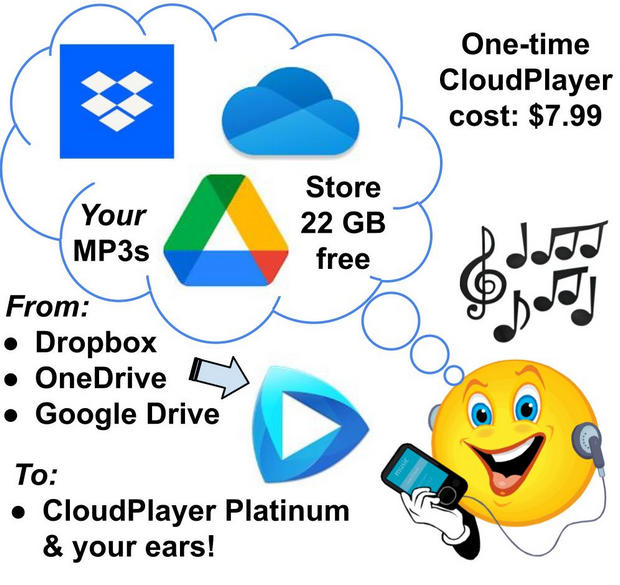
I use this app several times a day to stream my own MP3 music files, for free, from their storage locations on my various cloud drives to my earbuds, smart speakers, etc. (See details about my process here: "Replacing Google Play Music: How I Store & Stream 22 GB of My Own Music (MP3s) for a One-Time Cost of $7.99")
Here's a summary from their Play Store listing, my bold added:
"CloudPlayer is a revolutionary music player that puts you in control of your music, no matter where it's stored. Use it as an offline music player or link your Dropbox, OneDrive and Google Drive [Google Drive is supported for existing users only, not new users] to create a giant cloud jukebox for all your music. Stream or download from your cloud accounts for offline playback. Enjoy built-in cloud playlist back-up & sync, Chromecast support, hi-fidelity FLAC & ALAC lossless sound, gapless playback, 10-band EQ, Android Wear & Android Auto support and more."
[Note to Apple users: It appears that this app is not available for iOS devices. However, the publisher's website has an entire page with topics devoted to "doubleTwist for Mac OSX." I know nothing about the Apple/iOS world, so you'll have to investigate this on your own here. Sorry! -- MG]
Package Buddy Pro

I've been using this for years to track all my packages, regardless of shipper, across all my devices (tablets, phone, Chromebook). Just enter the tracking code and (optionally) add your custom name for the shipment and the app picks up all the rest of the info from the web. Open the app to see the updated progress of your shipment. It also keeps a historical record of stuff I've sent/received. Recently I counted well over 100 carriers tracked by these guys! (See the whole list at their Play Store listing).
[This app does not appear to be available at the Apple App Store.]
PDF converter pro & PDF editor - pdf merge

I don't use this often, but when I need it it proves to be a real powerhouse for manipulating, converting and generally doing anything you want with PDFs. Their Play Store listing summarizes (I've substantially edited for brevity --MG):
"PDF Converter & PDF Editor is very comprehensive tool to perform various operations on PDF files:
- Convert Word (or Doc) files to PDF file
- Convert JPG Image to PDF file
- Convert a html webpage into PDF and save for later
- Merge/Combine PDF documents into a single one.
- Split PDF file into smaller units.
- Encrypt your PDF file & add password protection
- Remove password from a file
- Delete selected pages
- Extract selected pages (and extract graphics)
- Add a watermark to your file
- Rotate selected pages of a file
- Compress (reduce size) of a PDF document
[This app does not appear to be available at the Apple App Store, though there are many PDF editors and converters listed there. For more on what's out there for your iOS device, see techradar's "Best PDF reader for Mac 2022: Free and paid" or iGeeksblog's Best PDF editors for iPhone and iPad in 2022 [Reviewed]
Conclusion
Over the years I've paid for many more apps than the above five. Some of those I've bought are oddball, esoteric or have proven to be not so useful over time. I decided to share the apps above, however, because each is powerful, a good value and can be valuable for almost anyone! So I hereby endorse them as being worth the small purchase price they ask from their users. If you need any of the capabilities they provide, I highly recommend you check them out!