Friday, January 28, 2022

Replacing Google Play Music: How I Store & Stream 22 GB of My Own Music (MP3s) for a One-Time Cost of $7.99


Ah, Google Play Music... How I miss you!


Once upon a time, I was a loyal and satisfied Google Play Music customer. I used it to:
  • Upload and store thousands of my own MP3 music files (many pulled from my own CDs) in the cloud.
  • Search for and purchase new music as MP3 files.
  • Stream music to my Android tablet and phone.
  • Save and play my custom playlists offline.
  • Cast music to any combination of my eight Google Home speakers.
  • Stream music from my phone to my Android Auto screen and control playback hands-free while driving.
And all this was free of any monthly costs and free of advertising. The only cost was a one-time purchase fee for new songs or albums from the Google Play store.

And then Google killed Google Play Music and replaced it with YouTube Music, which requires that I pay a monthly fee for doing many of the things that Play Music did for free. Worse, they insert ads where there had been none before!

The bottom line: I decided to figure out how to replicate the old Google Play Music experience using free alternatives. And I'm pleased to say that my new music streaming system works great!

My New Cloud Storage & Streaming System


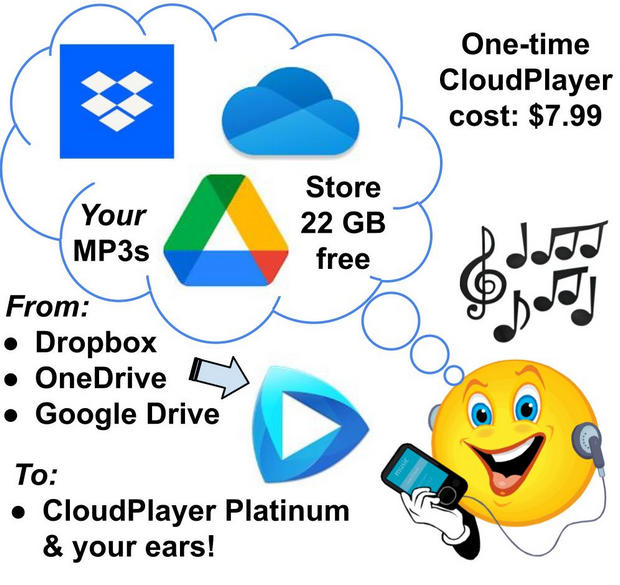
Here are the key components of my Google Play Music replacement:
Using the components above, I am able to do pretty much everything I was able to do with Google Play Music, including casting music to any cast-enabled device. The only thing missing is the ability to initiate music playing by saying, "Okay Google, play [playlist]..." Instead, I use my phone or tablet as a remote control to begin casting a particular playlist via CloudPlayer. Then, once the playlist has started playing on my Google Home or Nest smart speakers, I can use "Okay Google..." voice commands to stop, pause, rewind, tell me the name of the song that's playing, etc. So for a one-time cost of just $7.99 I get pretty much everything I need from my personal, custom-made, ad-free streaming service. **

(NOTE: If I had a TON of my own music and needed more than 22 GB I could buy 100 GB of storage for just $20/year from Google Drive. But, for now at least, I have plenty of cloud capacity so I'm going to stick with my free 22 GB storage strategy.)

So how can you set up your own service like this? It's easy! Below are the steps.


How to Build Your Own 22GB Cloud Streaming Service for One-Time Fee of $7.99

Wednesday, December 29, 2021

In Case You Missed Them: Some Ideas “Worth Sharing” from the Past Couple of Years

My strategy for getting through the pandemic:
Research, create, share, repeat... & relax!  😁


Introduction


These past couple of years have been difficult for us all, to say the least. [Insert your own pandemic-related miseries here as evidence.] If you’re like me, you’ve had to make a real effort to stay positive. And if we can’t always achieve the positive, then we can at least achieve a measure of sanity by doing the little things, and maybe a few big things, that keep us grounded. As a former trainer/consultant and author, I find that the act of creating and sharing something which has potential value for someone else provides meaning and a much-needed sense of purpose. Whether these creations are actually used and valued by anyone I can’t be sure. But I do know that the act of creating them puts me in touch with my muse or Source or whatever. And I felt much better as a result of making and releasing them.

Below are links to some items Worth Sharing that might have escaped your attention as you endured the last couple of years. Here you’ll find: 


  • Practical tools and info you can immediately use.

  • Mental health tools and encouragement (including a few audio podcasts) that can help you acquire perspective and get through these tough times.

  • Some moral and ethical challenges

  • Some links to the creations that I’d like to share as my legacy. (Almost all of these are absolutely free.)


I hope you find something valuable here. 

Tuesday, November 23, 2021

Is your video streaming tap leaking money? Here's a 4-step strategy for taking control.


It's money down the drain!


A leaky faucet can be insidious thing. A barely noticeable drip, drip, drip easily falls below our awareness. Yet running hour after hour, day after day, it can siphon away a huge amount of water and lead to a massive surprise water bill. And worse, the water is pointlessly gone without ever being used!

Monthly payments can be like that dripping faucet. Seemingly insignificant expenses can easily fall below the radar as we automatically pay them and go about our busy lives. And when these expenses are for stuff we don't really use, well... that's just a stupid waste!

In this article I'm going to challenge you to think about one category of monthly expenses that can easily get out of control if you don't consciously manage it. I'm talking about streaming services. And like the water from that dripping faucet, the dollars spent on that unused (or underused) streaming service is gone forever, leaving you with nothing to show for having spent them! Consider this from Lifewire.com:
"The average person who uses streaming services subscribes to between five and seven services. You know the ones: Netflix, Hulu, Amazon Prime, Disney+, Apple TV+, Discovery+, Paramount+, Peacock, HBO Max, and others."
So let's say you are limiting yourself to five of these. The basic, ad-free versions of five of the services above could get you a monthly bill of around $65. Subscribe to all nine of the services listed and you'll be paying well over $100/month with fees. Add this to your cable bill (Why are you still buying cable!?! Can't you use an antenna?? That's a topic for another day...) and your internet bill and WOW -- that can add up to some very big bucks spent on content!  

Seriously: Step back and ask yourself: Do you actually use every one of your streaming services every day? ... every week? Do your payments stop when you're not using a service? Have you really "dug deep" into the catalogs of any of your services to see what shows you're paying for, but not watching?  If any of these questions make you uncomfortable, then you're ready for a more disciplined, strategic approach to your streaming. 

A Four-Step Strategy for Taking Control of Your Media Streaming